
Before inviting players, make sure your team meets the roster requirements. Your roster must include at least 7 unique families to be considered complete.
How to invite players
Head to your Team tab and look for the “Add player(s)” button
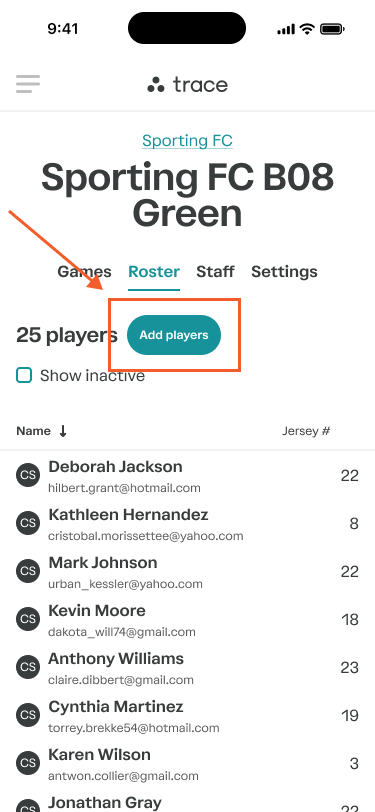
Once you tap it, you’ll see two simple ways to invite families:
1. Share an invite link
Tap the Link tab
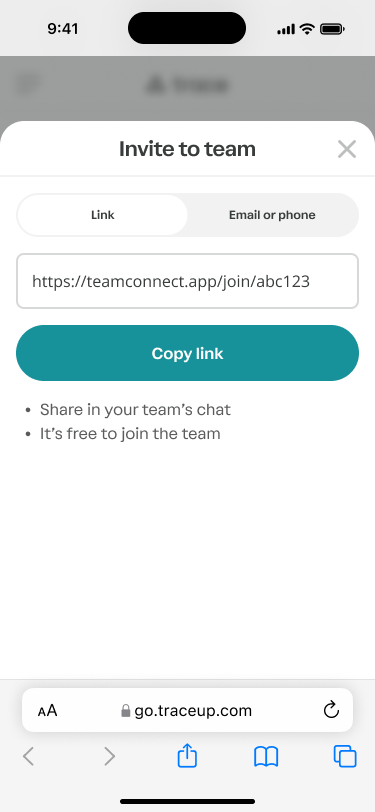
Copy your team’s unique invite link
Drop it into your team chat, group text, or email thread
This is the fastest way to get everyone in.
2. Send an invite directly
Switch to the Email or phone tab
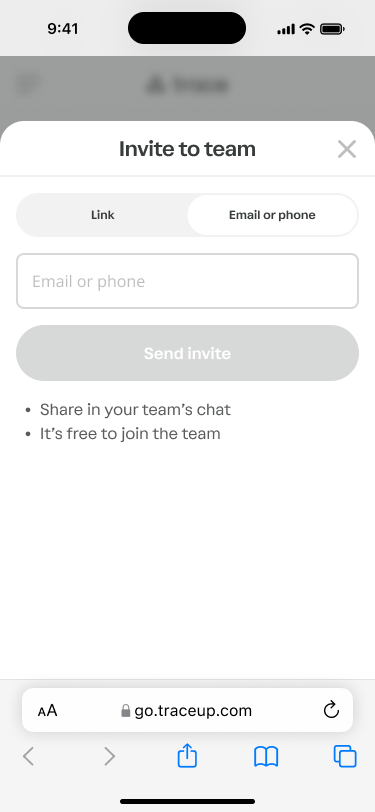
Enter a parent’s email or phone number
Tap Send invite
They’ll get a message with everything they need to join your team.
What happens after I invite team members?
Once invited, joining the team is simple—and free.
Roster members can join the team for free
Roster members can watch livestreams for free
If they want more, they can upgrade anytime:
Subscribe to watch the processed full game
Access personalized highlights for their player